
Freelancer
The one-site exit
$19
/moor $190/yr — pay 10 months, get 12
Start Freelancer- 50 credits per month
- Unlimited site
- 1 credit = 1 document (page, template, header or footer)
- 90+ widget mappings
- Human customer support
Brxify is a cloud Elementor to Bricks converter for WordPress. It converts an Elementor export into a working Bricks draft — real elements, mapped BEM global classes, every breakpoint, template documents. Not a screenshot. Not an AI rewrite. A draft you can open and finish.
Output from a live ThemeForest kit conversion.
The six things people check before they trust a migration tool.
A cloud converter that reads an Elementor document and writes a native Bricks draft on your WordPress site, with a per-document report.
1 credit per document. Plans start at $19/month for 50 credits. Every site gets 3 free credits with no card and no signup.
Native Bricks elements, BEM-named global classes, Bricks theme styles from your Elementor kit, real breakpoints, and template documents.
Your Elementor data. Brxify writes Bricks drafts. Your live Elementor pages keep rendering until you decide to cut over.
80–90% of typical layouts land pixel-close; top-selling ThemeForest kits test at 90%+. Anything unmapped is listed with widget, count and location.
Hello Elementor with Elementor Free and Pro, plus Theme Builder and WooCommerce widgets. Bricks must be active on the site you convert into.
Nothing against Elementor — it built millions of sites. But when it's time to move to Bricks, the manual rebuild is the part everyone dreads.
A hero can be a dozen containers deep. Bricks doesn't work that way, and a manual migration is mostly unwrapping — careful, repetitive work nobody budgets for.
Colours, typography, buttons, container widths — all of it re-entered into Bricks theme styles by hand. Once per site. Every site.
That's a realistic manual budget, and the honest reason most "we'll migrate you" quotes cost more than a full year of any Brxify plan.
No sales calls, no demos, no "book a slot". Export, convert, review.
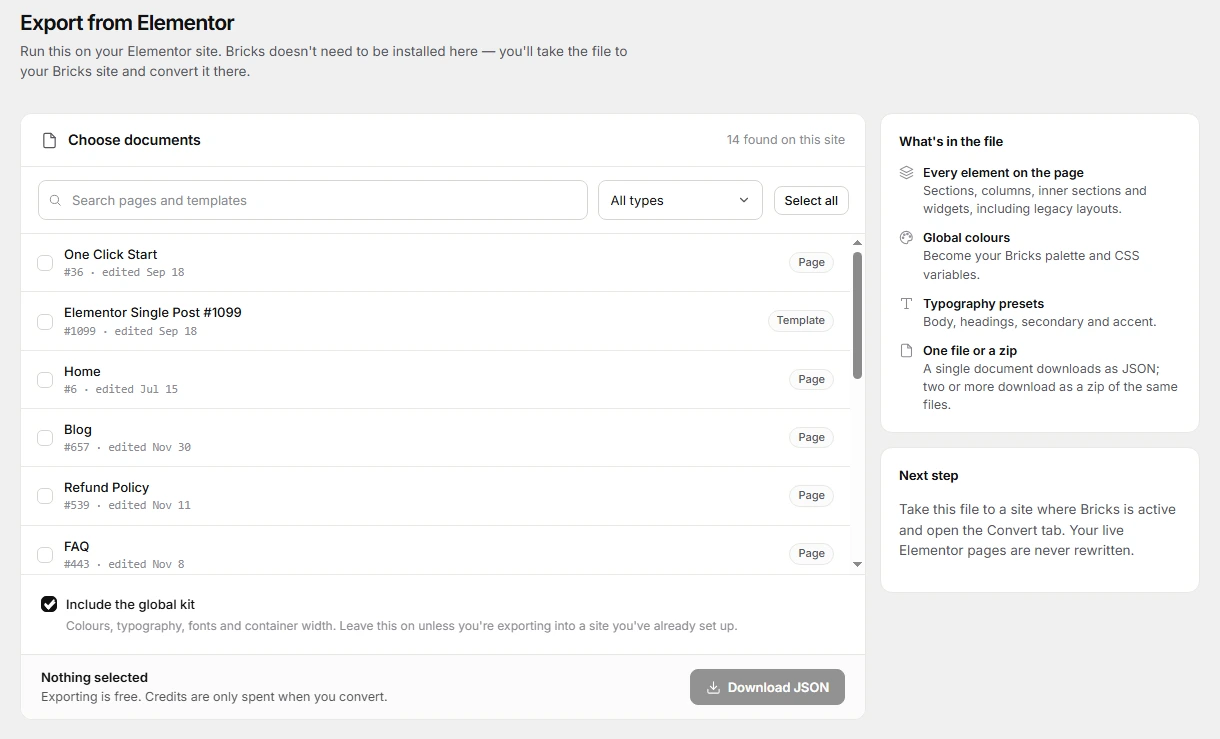
Brxify's Export tab bundles the page and your global kit into one JSON file. Bricks doesn't need to be installed on that site. Takes about a minute.
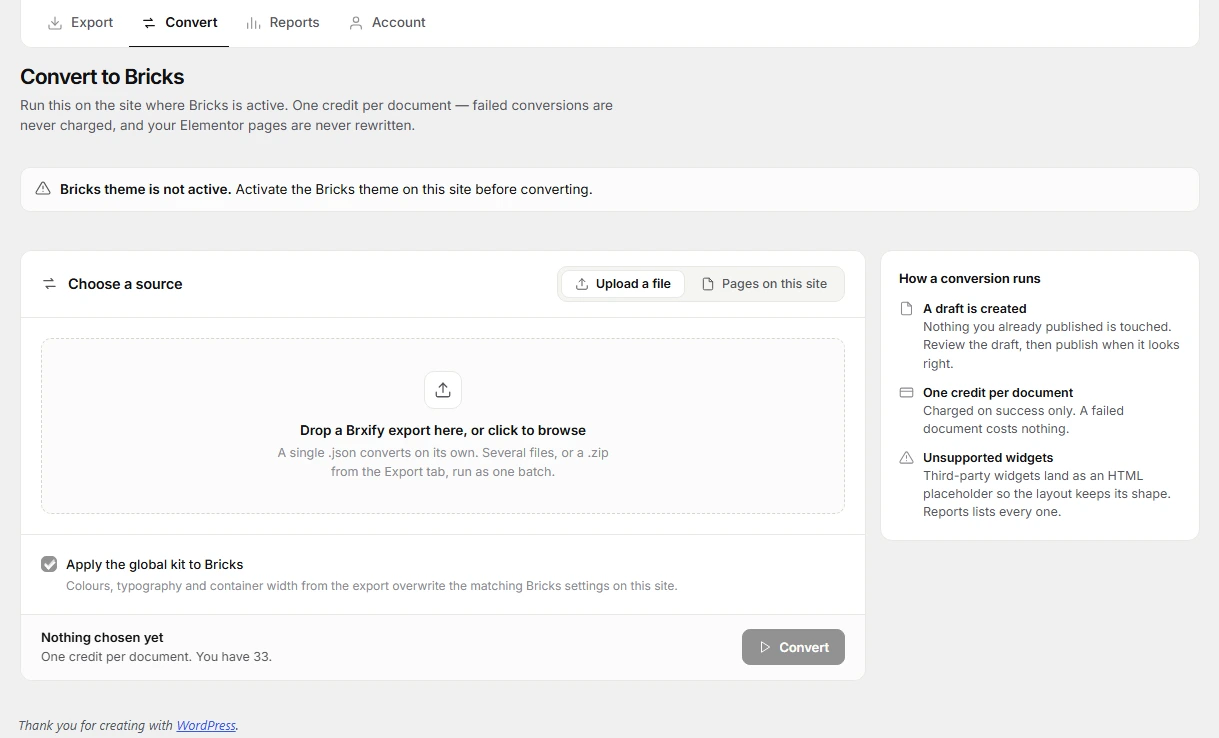
Upload the JSON where Bricks is active and press Convert. One credit per successful document — failed conversions are never charged.
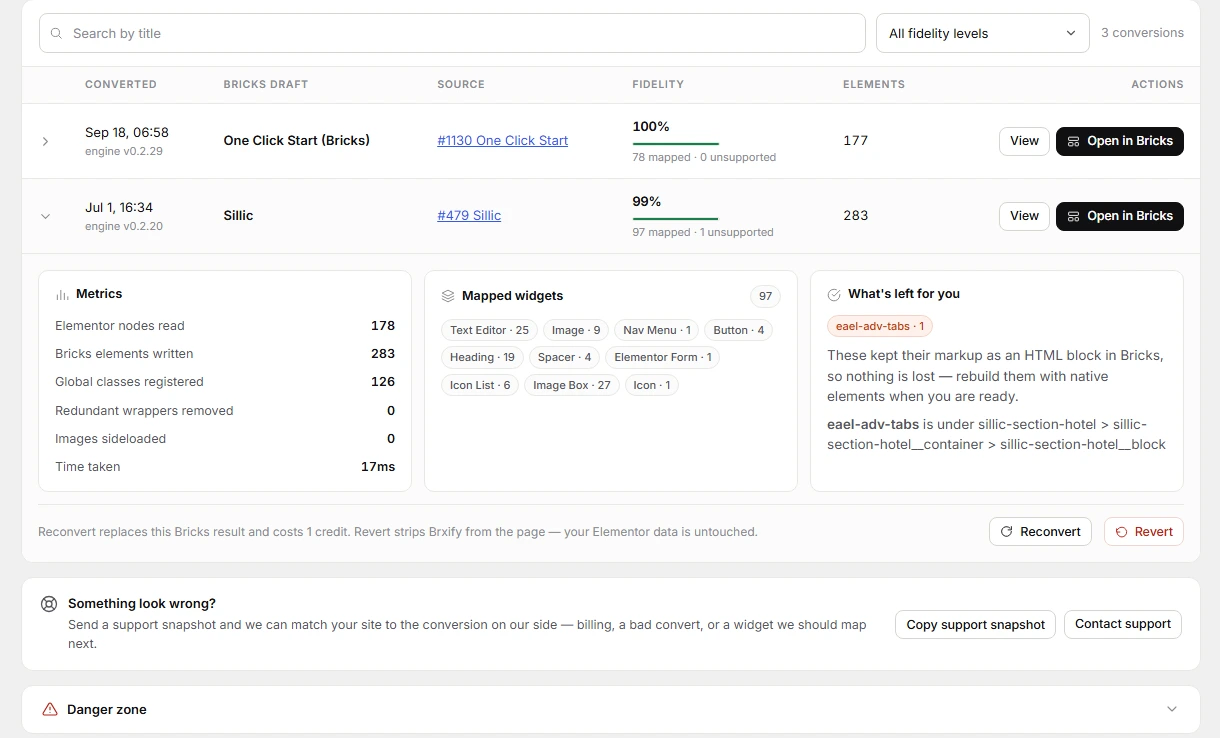
Open the draft in Bricks and skim the report: what mapped, what didn't, and where. The leftover work is normal Bricks building — with the brief already written.
Brxify only ever creates Bricks drafts — it never rewrites your live Elementor content. Most teams keep Elementor on production and convert on staging. You can run both builders on one site while you review.
Mapped widgets become native elements, named classes, and real breakpoints. You edit them in Bricks.
.hero__title if you named it, .home-section-bravo__title if you didn't. Inline styles only when Bricks has no control for it.
Your Elementor kit — colours, typography, buttons, layout and spacing — lands in Bricks theme styles, the colour palette and global settings.
Headers, footers, singles and archives become Bricks templates. Display rules are a short polish pass in Bricks, and the report says which ones.
Mobile, tablet and Elementor's extra breakpoints — laptop, widescreen, custom — map to real Bricks breakpoints. Media queries, not vibes.
Post titles, ACF fields, archives and product widgets map to Bricks dynamic tags and native elements. Your blog and your shop survive the move.
Unsupported widgets are flagged with counts and locations, and kept as HTML placeholders so the layout holds its shape. Nothing disappears quietly.
Most top-selling ThemeForest Elementor kits come out pixel-close. For the remainder, the report lists the exact widgets, counts and locations — so the polish is a scoped task, not an archaeology dig.
Same destination. Very different weeks.
| Manual rebuild | Brxify | |
|---|---|---|
| Time per site | 10–20 hours | An afternoon, report included |
| Global kit | Re-typed by hand | Mapped into Bricks theme styles automatically |
| Template documents | Rebuilt from memory | Convert; display rules are a polish pass |
| Leftover unknowns | Discovered at publish, 9pm | Flagged in the report, 9am |
| Cost | One big invoice | From $19/month, or one-time top-ups |
| Where it runs | Your site's PHP burns through the whole rebuild | Our cloud does the mapping — your hosting stays idle |
A handful of migrated pages usually bills for more than a month of any plan here.
One-time top-up: $9 for 20 credits. Never expires, stacks on any plan, and works on its own.
Every site starts with 3 free credits — no card, no signup. Payments, VAT invoices and subscription management are handled by Freemius. The WordPress plugin is GPLv2 or later; the mapping engine stays on our servers. By using this service you agree to our Privacy Policy and Terms of Service.
The ones everyone asks before buying.
No. You choose the path.
Export → Import: run Export on your Elementor site to get a JSON or zip, then convert on a Bricks site. Live Elementor pages are never rewritten.
In-place: Brxify writes Bricks data onto the same post and leaves _elementor_data alone. Visitors keep seeing Elementor until you deactivate it.
80–90% of typical layouts come out pixel-close, and top-selling ThemeForest kits test at 90%+. The rest is listed in the report — widget, count, location. We show you the list rather than claiming a number we can't hold.
Yes — sections, columns and inner-sections all convert to real Bricks structure with BEM classes, not inline soup. For the cleanest result, run Elementor's own "convert to containers" migration first, give it a quick polish, then convert with Brxify.
On the site you convert into, yes — converting to Bricks without Bricks installed would just be JSON. On the site you export from, no: Export runs on a plain Elementor install.
Mostly covered. Elementor Free and Pro widgets, Theme Builder elements and WooCommerce widgets all map. Template documents convert, though some display rules are a polish pass in Bricks. Dynamic data maps to Bricks dynamic tags, including ACF fields.
One credit converts one document — a page, template, header or footer. Plan credits refill monthly and don't stack. Top-up credits stack and never expire. Failed or rejected conversions are never charged.
Count your documents, not your pages or your installs. One licence key works on every site you convert — you pay per document, not per site. Freelancer ($19 · 50 credits) covers a typical one-site exit including templates. Pro ($49 · 200) and Agency ($79 · 600) are for volume. There is no lifetime deal: the mapping engine lives on our servers and improves without a reinstall. If you refuse subscriptions, the $9 / 20-credit top-up works on its own.
Conversion is solid for Hello Elementor with Elementor Free and Pro, which is what Brxify supports today. Third-party addon widgets are on the roadmap; anything that can't convert is flagged plainly in the report and kept as an HTML placeholder so your layout holds.
Payments, VAT invoices and subscription management are handled by Freemius — cards or PayPal, cancel anytime from your account portal. If you refuse subscriptions on principle, the one-time $9 top-up works on its own.
Unused credits can be refunded. Credits you've already consumed on a successful conversion can't. Cancel anytime from your Freemius account portal — access runs through the period you've paid for.
They stay in your WordPress media library. The convert payload carries image URLs, not the files. Your Bricks site sideloads them the same way a normal import would. We don't host a copy of your photos.
The Elementor JSON, and only when you press Convert. It is processed in memory and is not stored as a library of your sites. Connecting a licence sends the site URL and the key. Card data never touches us — Freemius is merchant of record. The full picture is in the Privacy Policy.
Yes. The WordPress plugin — the bridge you install — is GPLv2 or later, as stated in the plugin header. The hosted mapping engine is not shipped in the zip and is not a public dump of our transformers. Converting still needs a valid licence and credits.
Yes — one credit, same as the first convert. It overwrites the Bricks result only. Elementor is untouched. Failed reconverts are not charged. Don't reconvert a draft you've already polished in Bricks; that polish is replaced. Revert is the undo if you only want the Bricks write removed.
Different jobs. Bricks MCP lets an AI edit Bricks. Brxify converts a document you already built in Elementor.
Brxify does not call an AI and it does not call MCP. It is not a Bricks MCP server and it never sends your layout to an LLM. It reads Elementor JSON and writes native Bricks through fixed widget maps. Same input, same output. The leftover work is listed in the report.
Use Brxify to migrate. Use MCP when you want an agent inside Bricks after you're already there.
List is public. Vote on this or submit idea so we know what to map next. No account, no email harvest.
Display rules and leftover template chrome. The documents already convert.
Elementor stays until you cut over. You get a Bricks draft you can finish when export>imported in staging.
Styles land on Bricks global classes (.hero__title if you named it). Inline only when Bricks has no control.
Runs on our servers. Failures are free. The report names what’s left.
Undo our Bricks write, or run the page again. Elementor is not deleted. We skip pages you already…
Older layouts become real Bricks structure and BEM classes.
Headers, footers, singles, and archives convert, including tablet and mobile or custom breakpoints.
Colors, type, buttons, and layout - width/spacing land in Bricks theme styles.
90+ Elementor Free & Pro widgets map to native Bricks. Unknowns are listed, not deleted.
No Ideas submitted yet. Be the first!
3 free credits, no card, no signup. Upload one real page, read the report, and decide with your own data instead of ours.
Brxify is an independent tool, not affiliated with, endorsed by, or sponsored by Elementor or Bricks Builder.